> For the complete documentation index, see [llms.txt](https://lakm.gitbook.io/evaluator/llms.txt). Markdown versions of documentation pages are available by appending `.md` to page URLs; this page is available as [Markdown](https://lakm.gitbook.io/evaluator/theming.md).
# Theming
We provide convenient theming options to match your design.
### Presets
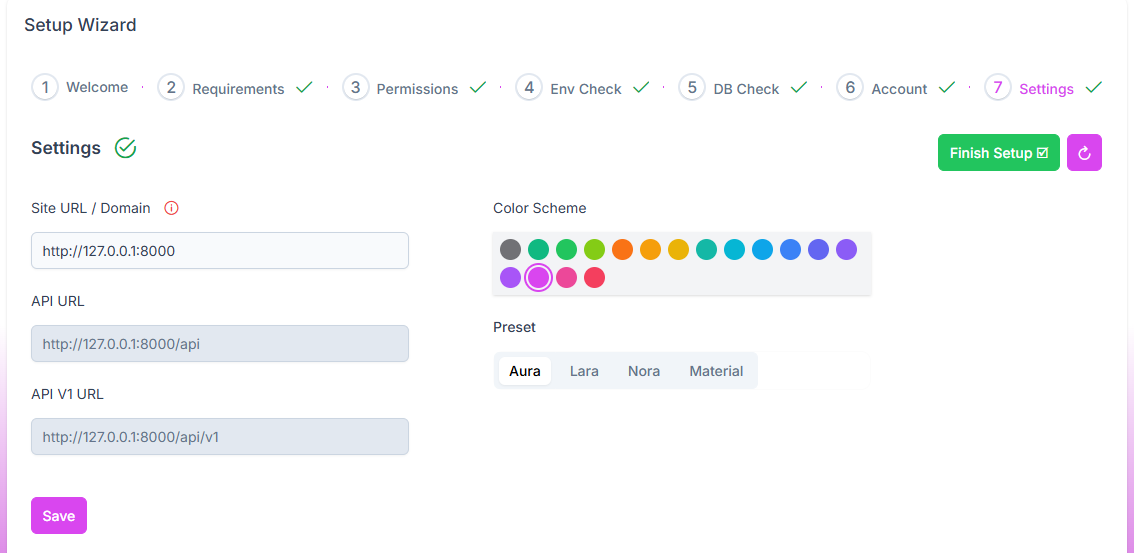
Presets define overall design of the site. We provide following 4 different presets that you can choose.
* aura
* lara
* nora
* material
### Color Scheme
The color scheme defines the overall colors of the site.
#### Supported Colors
* noir,
* emerald,
* green,
* lime,
* orange,
* amber,
* yellow,
* teal,
* cyan,
* sky,
* blue,
* indigo,
* violet,
* purple,
* fuchsia,
* pink,
* rose,
#### Is your desired color not included in the supported color list?
Please contact us. we’ll do it for you for free.
### Change Theme
#### Setup Wizard
Setup wizard has a step for changing theme and some site settings.
#### Auth Menu
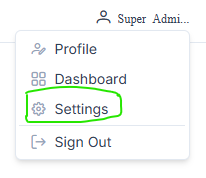
**Super Admin** also can change theme in settings from auth menu.